AI Social Media Scheduler: How Sabi Writes, Queues and Posts for You

Posted by
Latest Posts

An AI social media scheduler writes your posts, holds them for your approval, and publishes each one at its time without you opening an app. Sabi does all three from a text: you say what you want to share, she drafts a version for Facebook, Instagram, LinkedIn and X, and posts it when you approve.
That matters in 2026 because the hard part of social media for a founder was never the scheduling button. It was finding the hour to write the post in the first place.
What is an AI social media scheduler?
An AI social media scheduler is a tool that drafts post copy for each platform, keeps a queue of what is going out and when, and publishes on schedule. Classic schedulers such as Buffer, Hootsuite and Later started with the queue and added AI writing later.
Sabi started from the other end. She is an AI executive assistant who already knows your business, so writing the post is the part she does best.
The difference shows up in how you use it. With a classic scheduler you log into a dashboard, open a composer, type or prompt, pick channels, pick times. With Sabi you send one message: "Post our new article to LinkedIn and X on Tuesday at 9." She writes a version for each platform and puts both in your queue.
An AI social media scheduler earns its keep only if it removes the writing, not just the clicking: the post that never gets written is the one that costs you.
Why do founders struggle to post consistently?
Founders struggle to post consistently because writing takes real time every week, and it competes with client work that pays today. In an August 2026 survey of 501 UK small business owners and tradespeople by Markel Direct, 76% said they spend time every week creating or editing social media content, and 11% spend up to a full working day on it.
The payoff for showing up is real. Buffer looked at more than 100,000 of its users over 26 weeks and found that people who posted in 20 or more of those weeks saw more than 5 times the engagement per post of people who posted 4 weeks or less.
Consistency beats volume: Buffer's study of 100,000+ accounts found weekly posters earned over 5x the engagement per post of people who posted in 4 weeks or fewer out of 26.
So the goal is not 30 posts a week. It is one or two good ones, every week, that you did not have to sit down and write.
How does Sabi schedule social media posts?
Sabi schedules social media posts in three steps: she drafts, you approve, she publishes. We call it the Text, Approve, Post loop, and it is the whole feature.
- Text. You tell Sabi what to post in chat or by text message. It can be a sentence ("remind people the workshop is Friday"), a link to an article, a transcript of a call, or a photo you upload. She writes one draft per platform, in your voice, in the first person.
- Approve. Each draft lands in the Social tab as a post card with its platform, account and time. You can approve it, edit the text, change the time, swap the photo, or tell Sabi what to change in plain words.
- Post. At the time you set, Sabi publishes the post to the account you picked. Then she texts you a short note with a link to the live post. If a post fails, she texts you that too, with the reason.
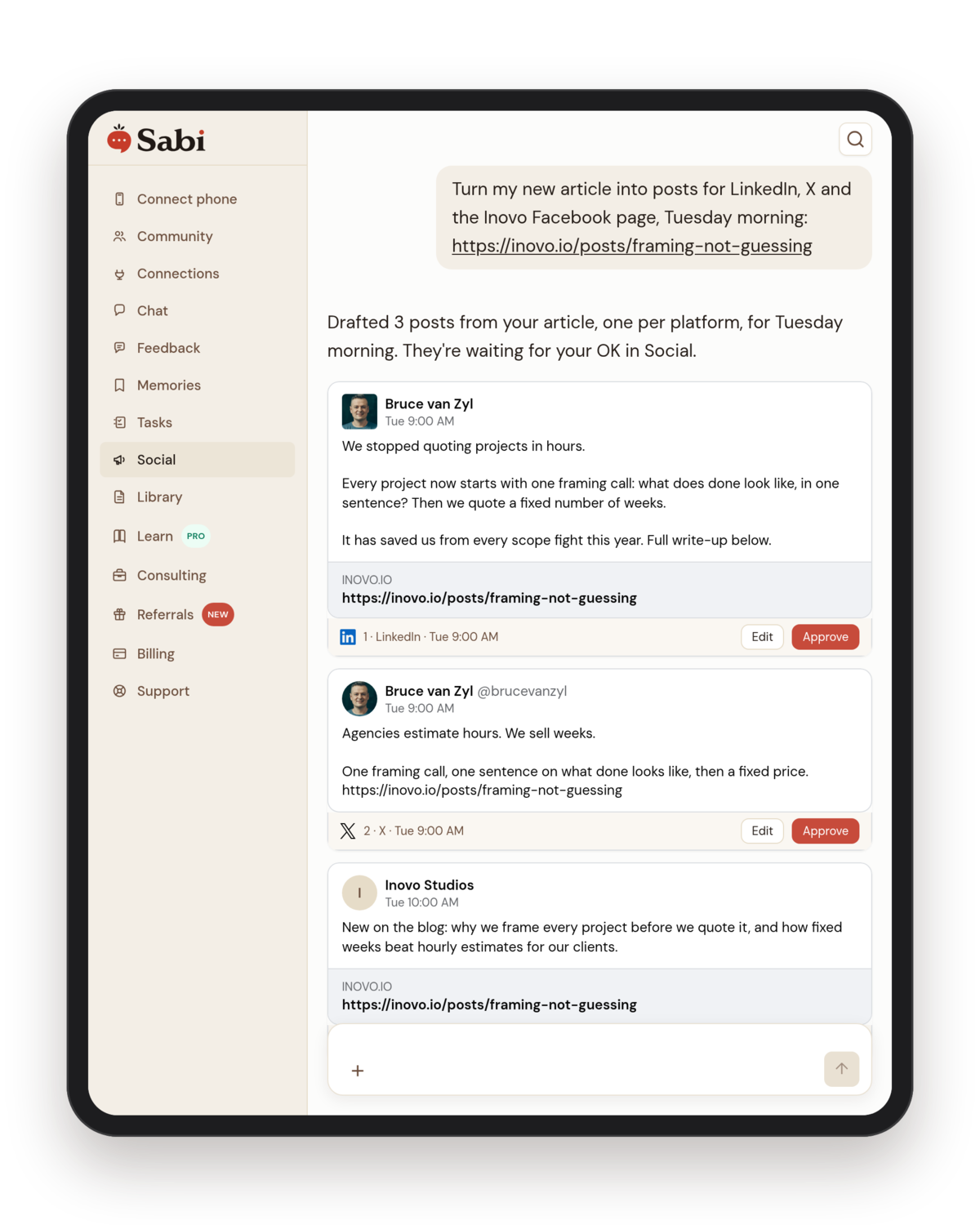
Step 1, Text: one message with an article link. Sabi writes a separate draft for each platform and shows each one as a post card you can approve right in chat.
The Social tab shows three numbers across the top: what needs your approval, what is scheduled (and how many days or weeks that covers), and what has already posted.
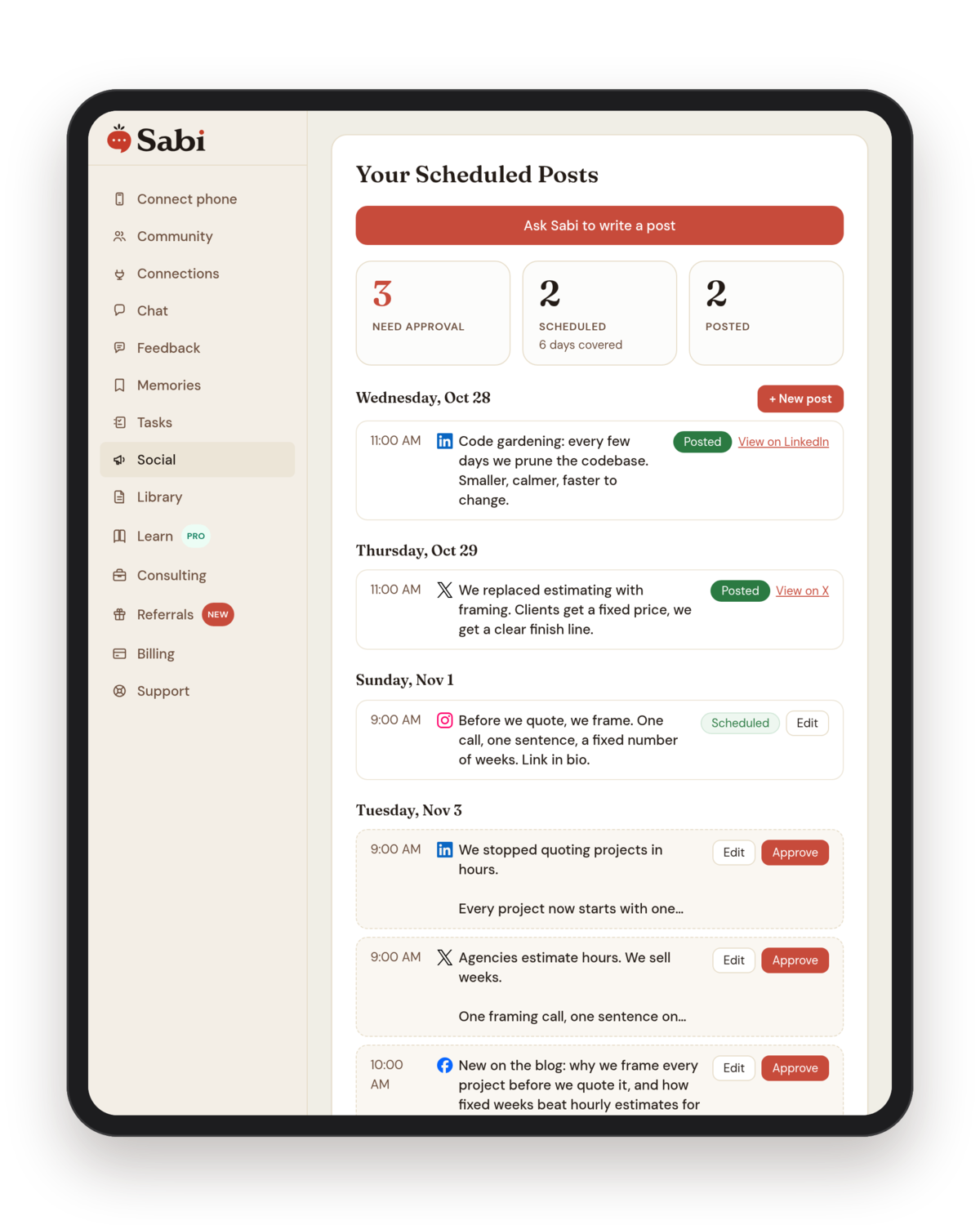
Step 2, Approve: the Social tab lists every post by day. Drafts wait with Edit and Approve; scheduled and posted ones show their status and a link to the live post.
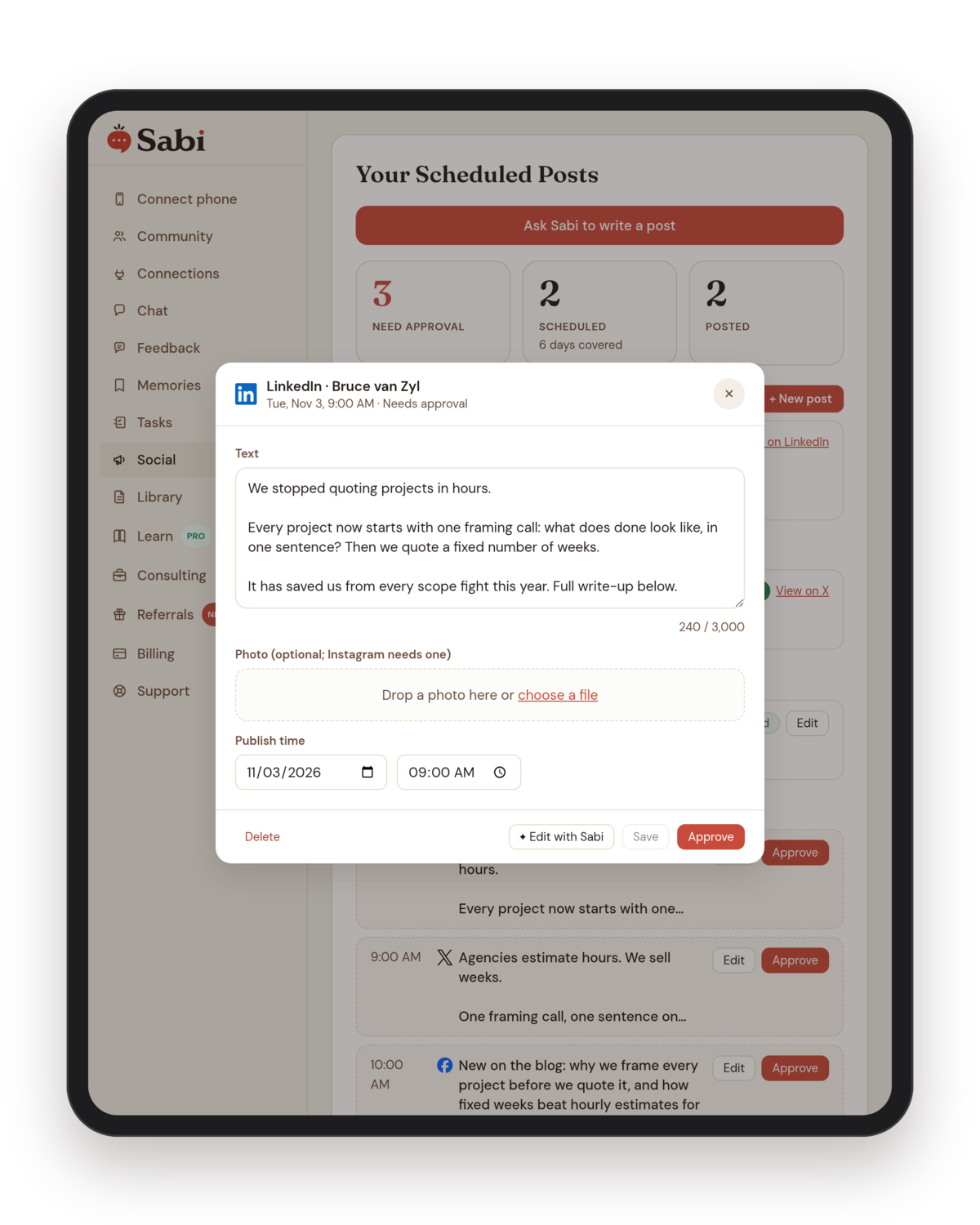
Open any draft to change the words, the photo or the time, or hand it back to Sabi with Edit with Sabi. Nothing posts until you tap Approve.
Sabi's Text, Approve, Post loop means nothing goes live until you approve it, and every published post comes back to you as a link you can tap.
Which platforms can Sabi post to?
Sabi posts to Facebook Pages, Instagram, LinkedIn and X, and she can publish long-form X Articles. Each platform gets its own copy: a LinkedIn post can run longer and read like a short story, an X post stays inside 280 characters, and an Instagram post always carries a photo because Instagram requires one.
If you run more than one account on a platform, such as two Instagram accounts or several Facebook Pages, Sabi asks which one each post should go to. In the Social tab, the New post button lets you pick the accounts yourself, and saving creates one post per account.
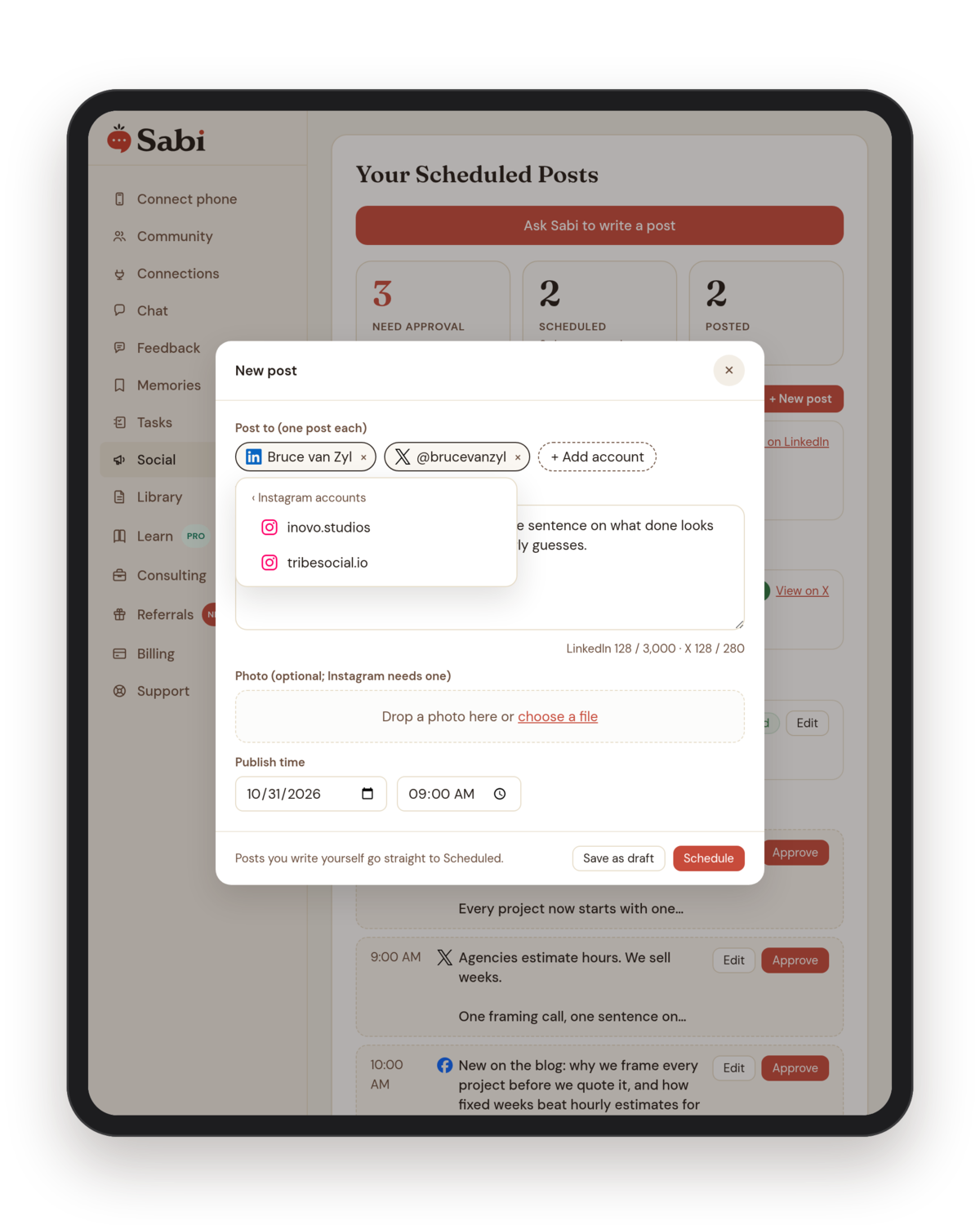
Writing a post yourself: pick each account it goes to (here LinkedIn and X, with a choice of two Instagram accounts), see the character count for each platform, and set the time.
Sabi writes a separate draft for each platform rather than pasting one caption everywhere, because LinkedIn, X, Facebook and Instagram reward different lengths and tones.
You connect each account once on the Connections page. After that, posting to it is a sentence in chat.
How is Sabi different from Buffer, Hootsuite or Later?
Sabi is different from Buffer, Hootsuite and Later because she is not only a social tool: she is an assistant who also runs your inbox, calendar and follow-ups, so your posts can come from the work you are already doing. A call transcript becomes three LinkedIn quotes. A blog post becomes a Facebook post and a thread on X. You never brief a separate app.
Here is how the classic tools price their plans, from their own pricing pages in October 2026:
| Tool | Starting price | What you get |
|---|---|---|
| Buffer | Free for 3 channels, then $5 per channel per month (Essentials) | Queue and scheduling, AI writing help |
| Later | $18.75 per month, billed yearly (Starter) | 1 social set, 8 profiles |
| Hootsuite | Starts at $99 per user per month, billed yearly (Standard) | 10 social accounts |
| Sabi | Included in Sabi Pro | Drafting in your voice, approval queue, publishing, plus email, calendar and the rest of Sabi |
If all you need is a calendar to load posts you already wrote, a classic scheduler is cheaper and does that job well. If the posts never get written, a cheaper calendar does not fix it.
Classic schedulers solve when a post goes out; Sabi solves whether it gets written at all, then handles the when as well.
Does Sabi post without asking me?
No. Sabi does not publish a post she drafted until you approve it. Drafts wait in your Social tab, and you approve them with one tap or by replying to her text.
There is one exception you control: a post you write yourself with New post in the Social tab goes straight to Scheduled, because you already wrote and reviewed it. You can still save it as a draft instead.
An AI scheduler that publishes without approval is a liability; Sabi keeps every drafted post in a queue until a human says yes.
How to schedule your first social post with Sabi: step by step
- Connect your accounts. Open Connections and connect Facebook, Instagram, LinkedIn or X. You do this once per account.
- Ask in your own words. Text Sabi something like "Write a LinkedIn post about why we frame every project before we quote it, for Tuesday at 9am."
- Check the draft. Open the post card in chat or the Social tab. Read it once. Edit a line or tell Sabi "make it shorter."
- Approve it. Tap Approve. The post moves to Scheduled and shows its time.
- Watch for the link. At 9am Tuesday the post goes live and Sabi texts you the link.
- Batch next week. Send Sabi one article or one call transcript and ask for a week of posts across your platforms. Approve them in one sitting.
You can see more of what Sabi does with content on the Sabi social media features page.
Common mistakes with AI social media scheduling
- Letting the tool write in a generic voice. A post that sounds like every other AI post gets scrolled past. Give Sabi your real material (a call, an article, a story from this week) and she writes from it, in the first person, as you.
- Posting the same caption everywhere. LinkedIn, X, Facebook and Instagram reward different lengths. One draft per platform takes Sabi seconds, and it reads better on each.
- Scheduling a month, then never looking. A queue you never check goes stale when news changes. Keep two to three weeks covered; the Social tab shows how far ahead you are.
- Skipping approval to save time. Approval takes a few seconds per post. Skipping it saves almost nothing and risks a post you would never have sent.
- Measuring volume instead of consistency. Buffer's data rewards showing up every week. Two good posts every week beats twenty in one week and none the next.
What are the limits today?
Sabi does not do social analytics, social listening or comment replies yet; the Social tab is for writing, approving and publishing. X is one connected account per Sabi today, while Facebook (several Pages) and Instagram can hold more than one. Instagram posts need a photo.
The Social tab is part of Sabi Pro. On the free plan, Sabi still writes your posts in chat, posts them right away to a connected account, or sets a task on your task board to post one later; what you do not get is the approval queue.
We built this for ourselves first. On October 29, 2026 we ran four posts through it on our own accounts (one LinkedIn post drafted in chat, plus X, Facebook and Instagram posts from New post, the Instagram one with a photo). All four went live at 11:00 a.m. Pacific, and Sabi texted a link to each one.
FAQ
Q: What is the best AI social media scheduler for a small business owner? A: The best one is the tool that gets your posts written, not only scheduled. If you already write posts, Buffer or Later are low-cost calendars. If writing is the bottleneck, an assistant like Sabi drafts the posts for you and publishes them after you approve.
Q: Can AI post to LinkedIn for me automatically? A: Yes. Sabi drafts a LinkedIn post in your voice, holds it for your approval, and publishes it to your LinkedIn profile at the time you choose. She texts you the link once it is live.
Q: Can I schedule Instagram posts with AI? A: Yes. Sabi drafts the caption and posts it with your photo at the time you set. Instagram requires an image, so upload one with the post or ask Sabi to use a photo saved in your Sabi Library.
Q: Does Sabi need a separate social media app? A: No. You connect Facebook, Instagram, LinkedIn and X once, then ask Sabi in chat or by text. The Social tab in your Sabi account shows the queue.
Q: Is the social media planner included in the free plan? A: No. The Social tab is part of Sabi Pro. On the free plan, Sabi still writes your posts in chat, posts right away to an account you have connected, and can schedule a post for later as a task on your task board.
TL;DR
- An AI social media scheduler drafts, queues and publishes posts; Sabi does all three from one text message.
- Sabi's Text, Approve, Post loop means nothing she drafts goes live until you approve it.
- Sabi posts to Facebook Pages, Instagram, LinkedIn and X, with a separate draft per platform.
- Buffer's study of 100,000+ users found consistent weekly posters got over 5x the engagement per post.
- Classic schedulers range from $5 per channel (Buffer) to $99 per user per month (Hootsuite); Sabi includes Social in Sabi Pro.
- Sabi texts you a link to every post once it is live, and tells you if one fails.
If writing posts is the part that never happens, meet Sabi and hand her next week's posts. Setup takes about 60 seconds.