How Bookkeepers Use an AI Assistant for Client Work and Leads

Posted by
Latest Posts
A bookkeeper in our community asked us two things. How can Sabi help with day-to-day client work, and how do I get qualified leads? This post answers both, with the apps to connect and briefs you can paste straight into a text.
Which apps can Sabi connect to for bookkeeping?
Sabi connects to 200+ apps. These are the ones bookkeepers use most. Connect each one once on the Connections page, then ask for what you need by text.
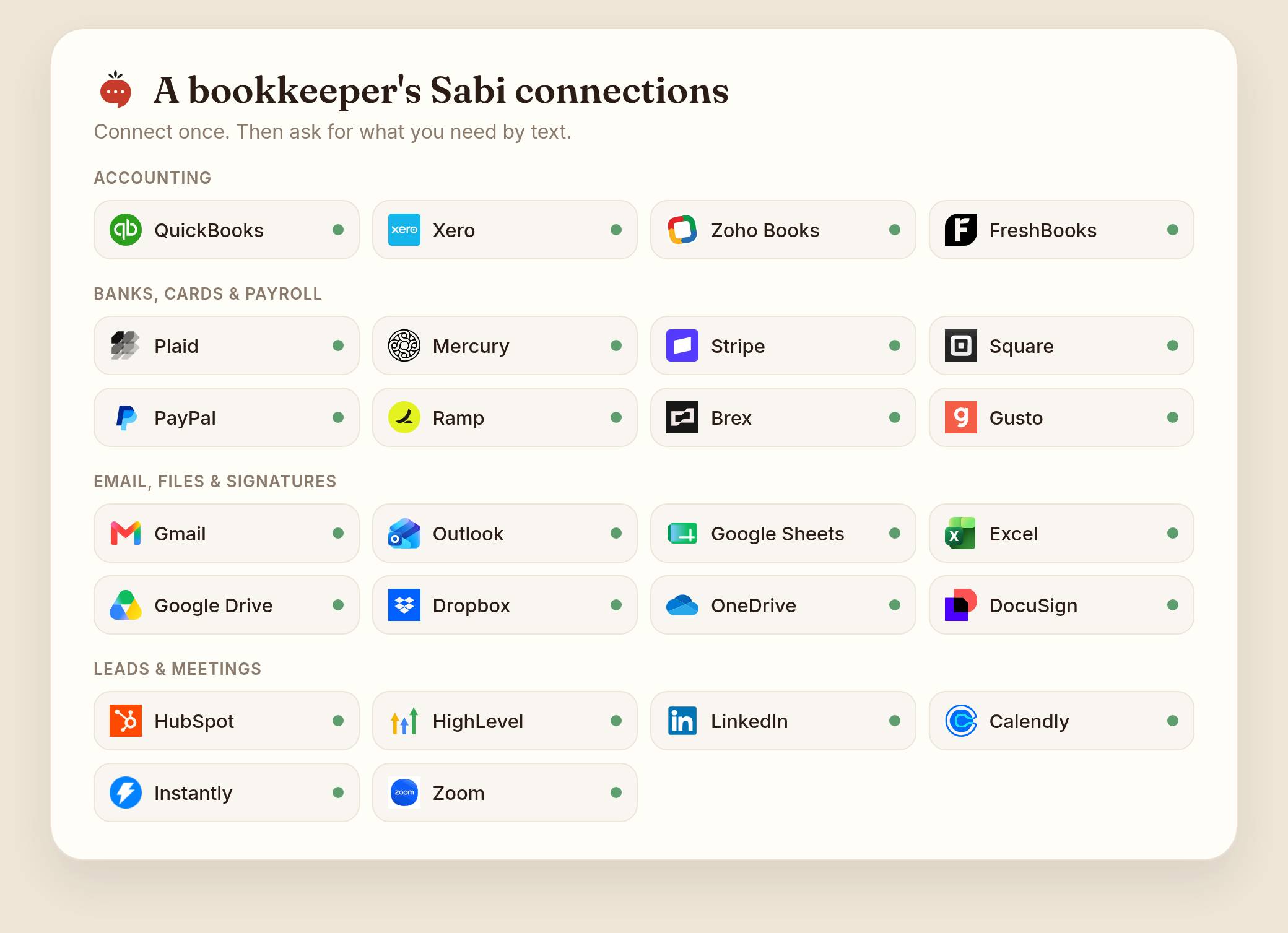
Accounting
- QuickBooks Online. Pull the P&L, balance sheet, aged receivables, and transaction lists. Find transactions with no receipt attached, and create invoices or bills when you ask.
- Xero. Look up invoices, contacts, bank transactions, and the P&L.
- Zoho Books. Invoices, bills, and bank transactions, including uncategorized ones she can categorize when you say so.
- Wave. Invoices, customers, and products for your smaller clients.
Banks, cards, and payroll
- Bank Accounts (Plaid). Read-only balances and transactions from your banks and cards. Good for a morning cash check or a running transaction log in a Google Sheet.
- Mercury. Balances, transactions, and payments for Mercury business accounts.
- Stripe, Square, and PayPal. Payments, payouts, refunds, and customers. Handy for matching payouts to deposits.
- Ramp and Brex. Card spend, memos, and accounting fields.
- Gusto. Payroll, employees, and contractors.
Email, files, and signatures
- Gmail and Outlook. Find client emails, label them, and draft replies. You can connect more than one inbox.
- Google Sheets and Excel. A month-end checklist or a lead tracker that Sabi keeps up to date for you.
- Google Drive, Dropbox, and OneDrive. Find statements and files, and organize client folders.
- DocuSign and PandaDoc. Send engagement letters and see who hasn't signed.
Leads and meetings
- HubSpot and HighLevel. Add leads, log notes, and move deals along.
- LinkedIn. Publish posts and comments from your profile.
- Calendly. Put your booking link in replies and see who booked.
- Instantly. Load leads into a cold email campaign and check the results.
- Zoom. Schedule client calls and pull meeting details.
One honest limit before you plan around this: Sabi connects to one QuickBooks company and one Xero organization per account today. For every other client, the inbox workflow below still works.
How do you set up a daily check for each client?
You text Sabi one scheduled task per client, written like instructions for a junior bookkeeper. We call it the Look, Check, Report brief: every task says where Sabi should look (the app, the client, the date range), what to check (receipts, categories, balances, documents), and how to report (a text, a Google Sheet, or email drafts for your approval).
Add one line to every brief: "If everything is clean, don't text me." Then the only morning texts you get are the ones that need you.
A Look, Check, Report brief turns Sabi into a daily reviewer for one client: one app, three checks, one short text, and silence when the books are clean.
Here are three workflows to copy. Swap in your client's name and your own times.
Workflow 1: Client inbox and month-end checklist (any software)
Every weekday at 8am, check my Gmail for new emails from anyone at @brightsmiledental.com. Label them "Bright Smile". Update the October close checklist in my "Bright Smile Dental" Google Sheet: bank statements, credit card statements, payroll report, and receipts. Text me what came in, what's still missing for month-end, and any question that needs my answer today.
Start here. It works for every client, whatever software they use, because it runs on your inbox and a spreadsheet. It's also what the bookkeepers and CPAs on Sabi actually run most: one CPA runs several inboxes through a single 8am check that puts client documents and tax notices at the top.
Workflow 2: Daily receipt and category check (QuickBooks)
Every weekday at 7am, look at yesterday's transactions in QuickBooks. List any expense of $75 or more with no receipt attached, anything sitting in Uncategorized Expense or Uncategorized Income, and any two charges from the same vendor for the same amount within 3 days. Text me a short list grouped by problem. If everything is clean, don't text me.
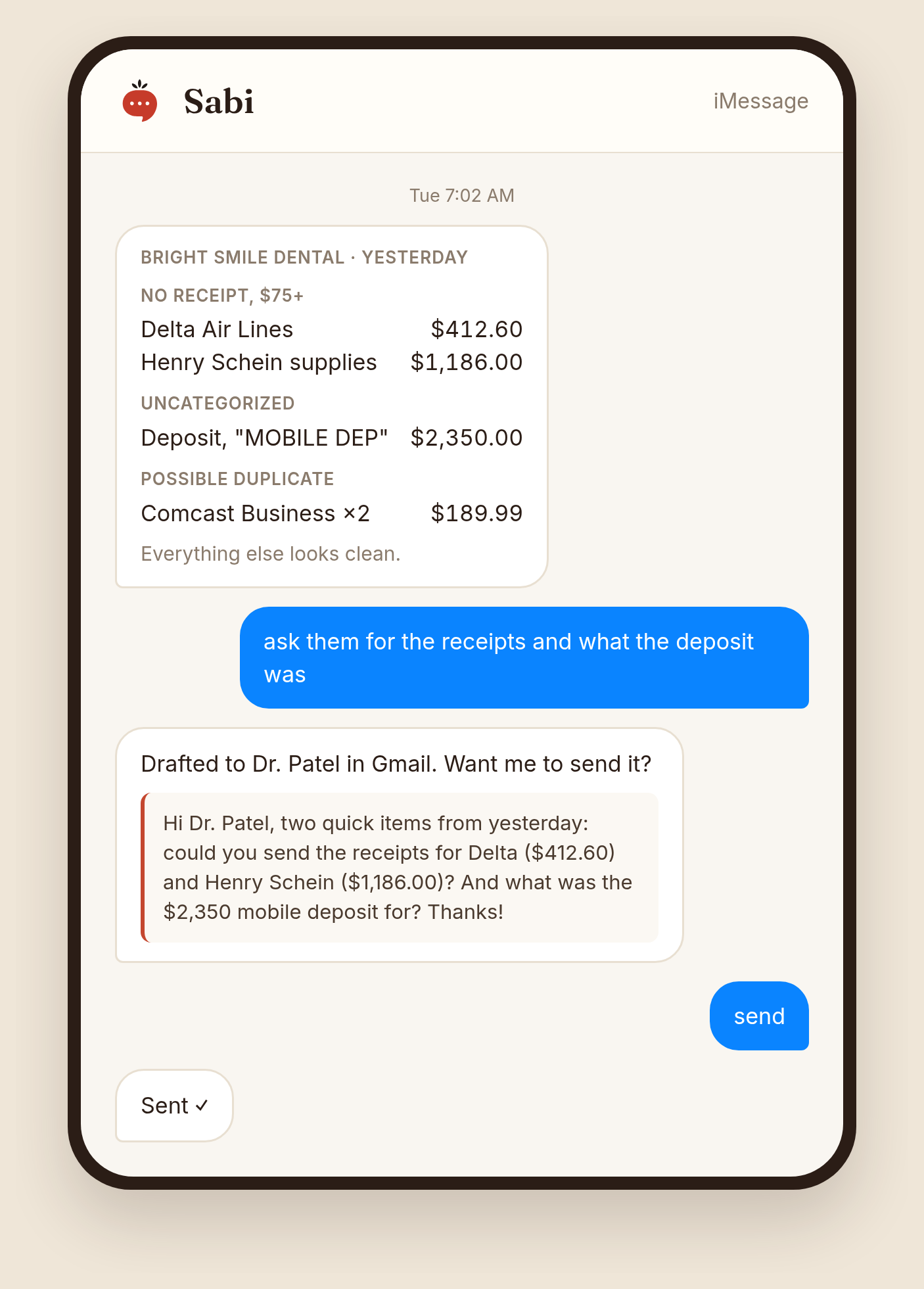
Reply "ask them" and Sabi drafts the receipt request to your client in Gmail, ready for you to send.
Workflow 3: Weekly unpaid-invoice follow-ups
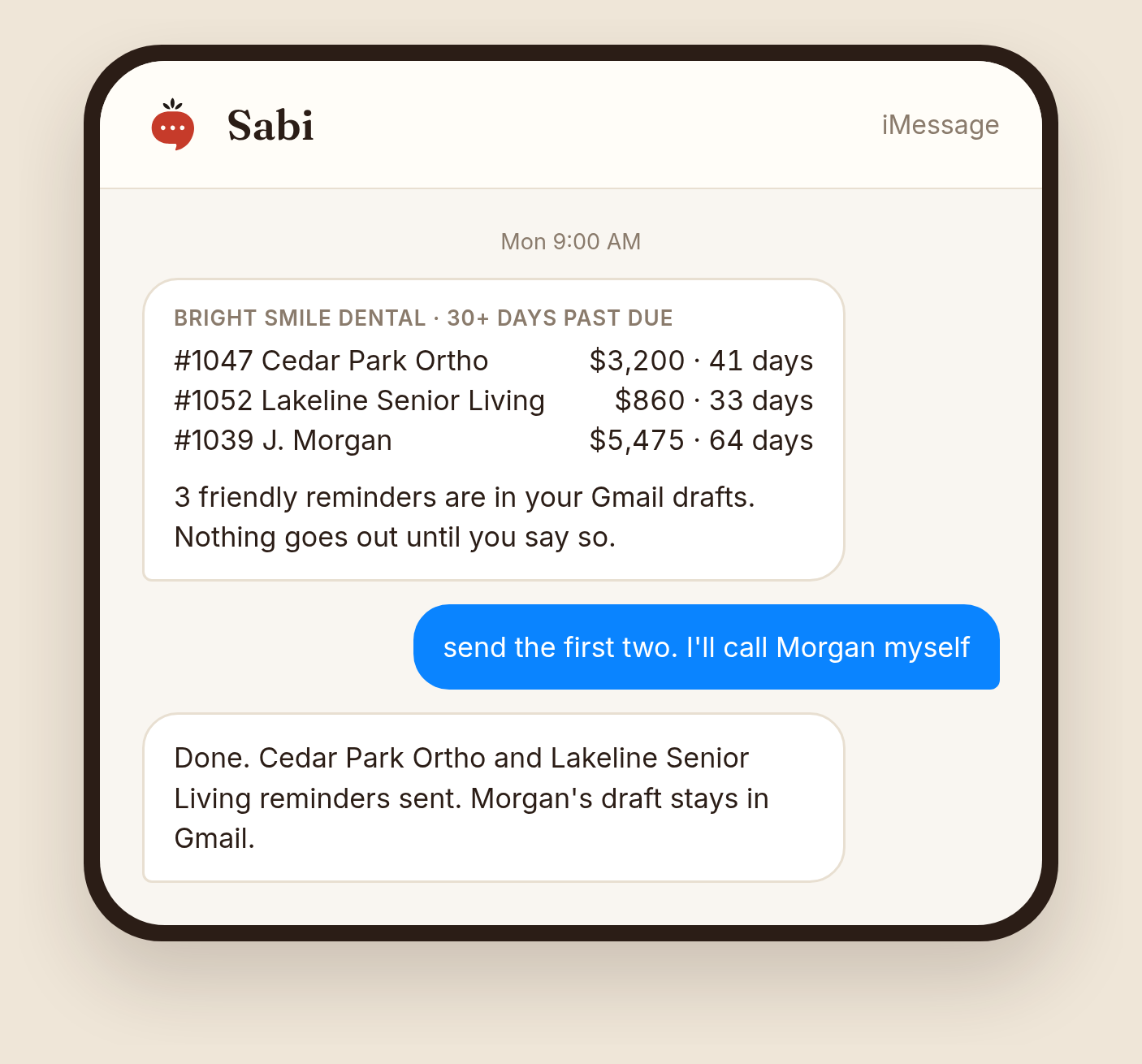
Every Monday at 9am, pull the aged receivables report from QuickBooks. For every invoice 30 or more days past due, draft a friendly reminder in Gmail to that customer with the invoice number, amount, and due date. Text me the list. Don't send anything until I reply "send".
A seasonal bonus. From November, add a weekly task that lists every contractor paid this year in QuickBooks, checks the client's Drive folder for a W-9 from each, and drafts W-9 requests for the missing ones. Form 1099-NEC is due to the IRS and to each recipient by January 31 (IRS instructions), and nobody wants to chase W-9s in the last week of January.
Two small habits from bookkeepers on Sabi. One CPA gets an hourly text, "What did you work on this past hour?", and her replies go into a time log for billing. Another has Sabi start a fresh daily checklist in Google Docs each morning, carrying over anything left undone yesterday.
How can a bookkeeper get qualified leads with Sabi?
Point Sabi at the channels that already bring bookkeepers clients: referrals, reviewed directory profiles, and fast replies to people who reach out. Cold outreach comes last.
The numbers back that order. In TaxDome's survey of 350 US businesses, 57% found their current accountant through a peer referral and only 3% through advertising (CPA Practice Advisor). The same survey found businesses will pay up to 25% more for specialists, and the top reasons they switch firms are poor responsiveness and lack of industry insight. Intuit says its Find-a-ProAdvisor directory generates a quarter-million leads a year (Intuit), and that most prospective clients won't look at a profile without reviews.
For a bookkeeper, the best lead workflows in Sabi build referral partners and reviews first, because 57% of businesses find their accountant through a referral.
Lead workflow 1: Weekly referral partners
Every Tuesday, find 5 people near Austin who serve dental practices but don't do bookkeeping: business attorneys, insurance brokers, commercial bankers, payroll reps, practice consultants. For each, give me the name, firm, website, and one specific reason we'd fit. Draft a short intro email from me in Gmail for each. Send me the list before anything goes out.
Lead workflow 2: Friday review requests
Every Friday at 3pm, ask me which clients I finished work for this week. When I reply, draft a short thank-you from me to each one asking for a review on my Find-a-ProAdvisor or Google profile, with the link. Show me the drafts before anything goes out.
A bookkeeping firm on Sabi runs a version of this every Friday. It works because you're asking right after a clean close, when the client is happiest.
Lead workflow 3: New-inquiry alert
Every hour from 8am to 6pm on weekdays, check my Gmail for new inquiries from my website form, Thumbtack, or Find-a-ProAdvisor. Text me the person's name, business, and what they need, with a reply drafted that includes my Calendly link. Add them to my "Leads" Google Sheet. If there's nothing new, stay quiet.
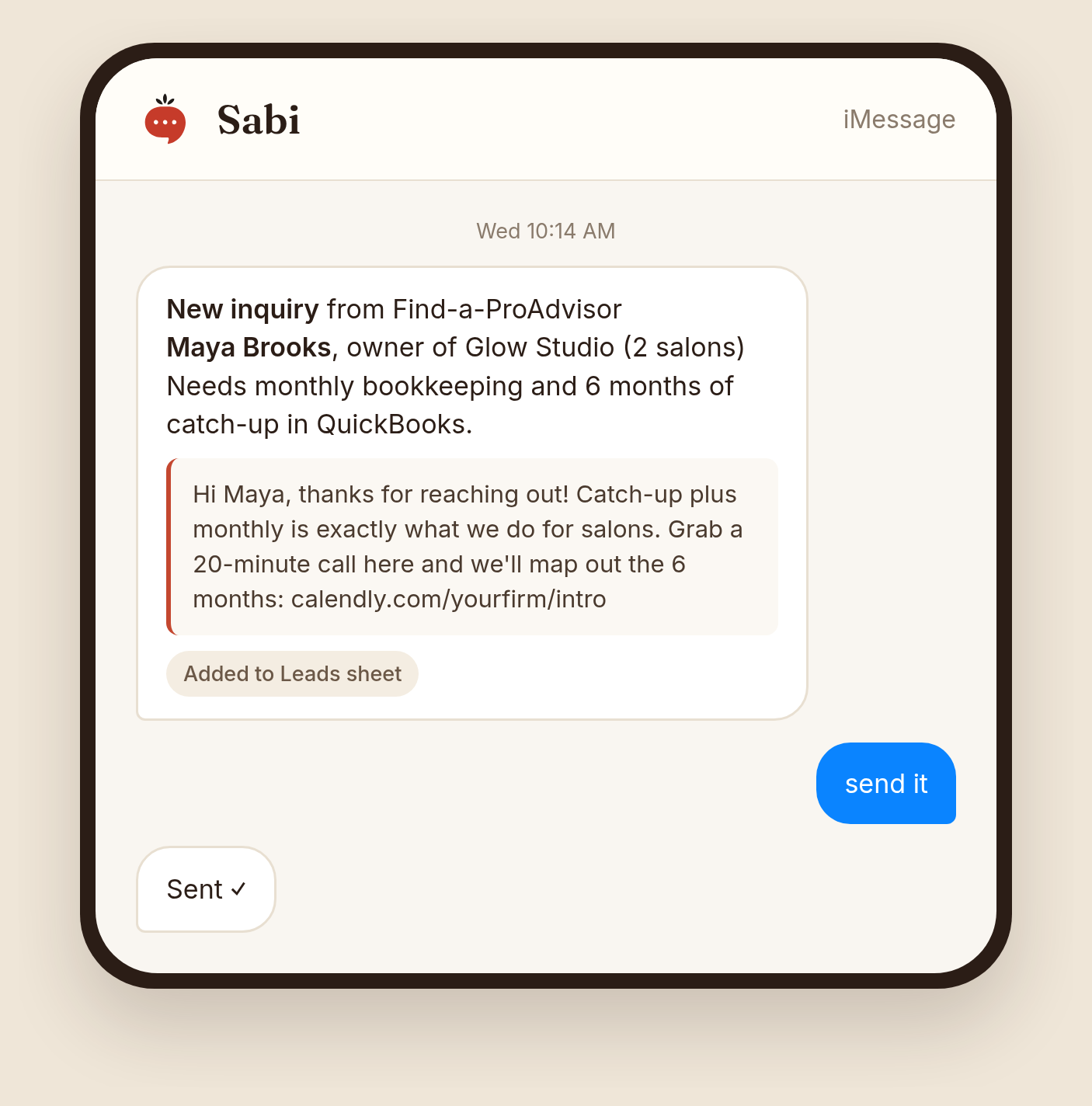
Want cold outreach as well? Bookkeeping firms on Sabi run a weekly task that researches 5 businesses in their niche, like salons or contractors, and drafts a personal email to each.
Doesn't QuickBooks already have AI for this?
Inside the ledger, yes, and you should use it. Intuit's QuickBooks agents automate transaction categorization, assist in reconciliation, and send invoice reminders (Intuit). Xero announced automatic bank reconciliation, payment follow-ups, and missing-receipt detection for its JAX assistant (Xero), mostly still marked "coming soon".
The gap is everything around the ledger. Firms run an average of 8 apps for core operations, and 66% of accountants feel overwhelmed by their tech at least weekly (Intuit survey). Client emails, document checklists, follow-ups, your own time, and your next client all live outside QuickBooks.
Let QuickBooks or Xero AI clean the ledger; use Sabi for the work around it: the inbox, the checklists, the follow-ups, and the leads, across every client and app, by text.
What can't Sabi do for a bookkeeper yet?
Sabi does the looking and the drafting. You still do the judgment calls.
- One QuickBooks company and one Xero organization per account. Use the inbox and spreadsheet workflow for the rest of your clients.
- No bank feed clicking. She won't match transactions in the QuickBooks bank feed or sign off a reconciliation. She flags; you fix.
- No client passwords. She can't sign in to a client's bank or portal with their login.
- Drafts first, by your rules. Write "don't send until I say" in the brief, and she waits for you.
How to set up your first client check: step by step
- Connect your apps. QuickBooks, Gmail, and Google Sheets cover most of the workflows above.
- Pick your messiest client. Start where you spend the most cleanup time each month.
- Text Sabi a Look, Check, Report brief. Paste one from this post and swap in the client's details.
- Say "run it now." Read the first report and tell her what to change, in plain words.
- Copy it for the next client. "Same inbox check as Bright Smile, but for Oak and Iron Contracting at 8:15."
Want more ideas? Browse Sabi's advanced workflows for recurring routines other business owners run.
Useful resources for bookkeepers
- IRS Publication 463: the receipt rules behind the $75 check.
- IRS 1099 instructions: deadlines for your January rush.
- QuickBooks Find-a-ProAdvisor: the directory clients search. Listings are free for Gold tier ProAdvisors.
- Intuit's 5 profile tips: photo, reviews, a clear "about me", a narrow niche, and every field filled in.
- Xero advisor directory: firms need Xero-trained staff and 8 or more clients on Xero to be listed.
- BLS outlook for bookkeepers: about 144,100 openings a year, with the role moving toward advisory work.
Common mistakes bookkeepers make with an AI assistant
- One giant task for every client. One task per client is easier to read, fix, and pause.
- Letting her send to clients on day one. Run drafts-only for two weeks, then loosen up.
- Vague briefs. "Check the books" gets you noise. Name the app, the date range, and the dollar line.
- No AI policy. Only 21% of firms have an AI policy or strategy (Karbon), even though 98% use AI. Write down which client data goes into which tools. For tax return information, IRC 7216 rules require the client's signed, written consent before you disclose it.
- No quiet rule. Without "if it's clean, don't text me", you get a text every morning and stop reading them.
FAQ
Q: Can an AI assistant reconcile QuickBooks for me? A: Sabi does the checking: missing receipts, uncategorized items, duplicates, and overdue invoices, every morning. You still match the bank feed and sign off the reconciliation in QuickBooks.
Q: How do bookkeepers get qualified leads? A: Mostly through referrals: 57% of US businesses in TaxDome's 2025 survey found their accountant that way. Build referral partners, collect reviews for your directory profile, and reply to new inquiries fast.
Q: Is my clients' data safe with Sabi? A: Your data isn't used to train public models, and staff have no dashboard access to your content. The details are on Sabi's security page.
TL;DR
- QuickBooks and Xero AI handle the ledger; Sabi handles the inbox, checklists, follow-ups, and leads around it.
- Sabi runs a daily check per client and texts you only when something needs you.
- Write every task as a Look, Check, Report brief: where to look, what to check, how to report.
- Copy three workflows: the client inbox checklist, the daily receipt and category check, and weekly unpaid-invoice follow-ups.
- For leads, start with referral partners and reviews; 57% of businesses find their accountant through a referral.
- Sabi connects to one QuickBooks company per account today, so use the inbox workflow for everyone else.
Want your first client check running by tomorrow morning? Meet Sabi and text her the brief.